Why isn’t my business showing up on Google?
If your business isn’t showing up on Google, most people are going to tell you to hire an SEO, read up on SEO, or call Google. Truth is, most of this stuff you can check yourself, for free, in a few minutes.
So let’s check the basics first. The fix depends on which kind of “not showing up” you’re dealing with.
First, figure out what “not showing up” means
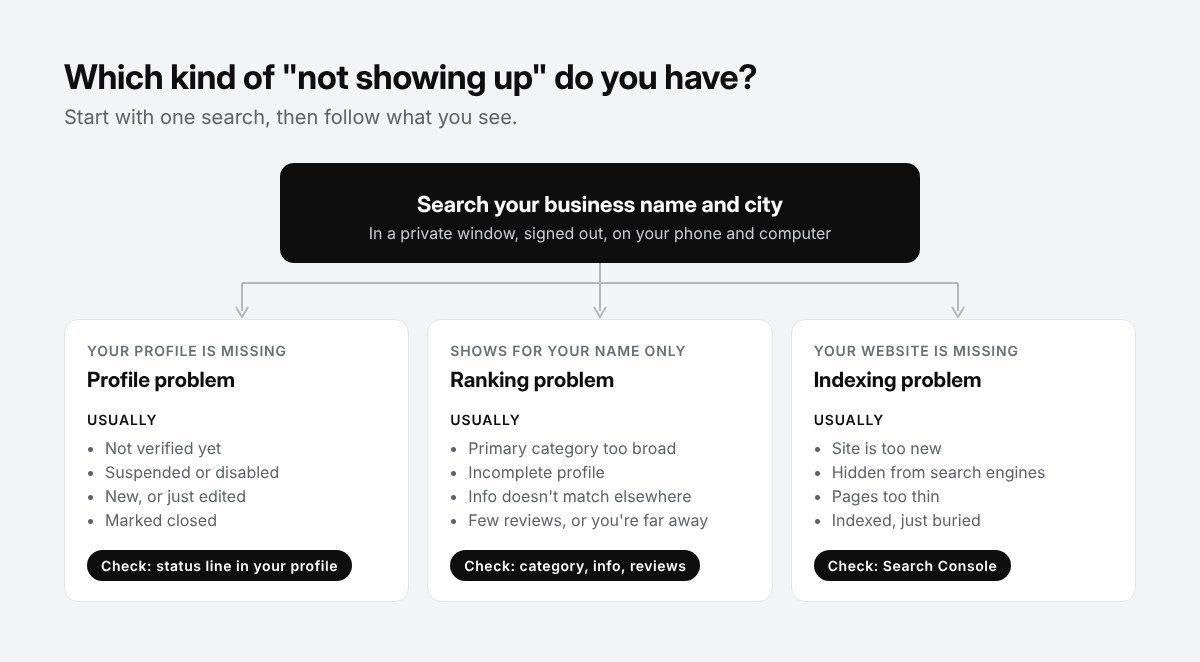
There are three different problems that all get described the same way:
- Your Business Profile doesn’t appear when you search your exact business name. That’s a profile problem: verification, suspension, or a setting.
- Your profile shows for your name, but not for searches like “plumber near me.” That’s a ranking problem. Google knows you exist; it just isn’t choosing you.
sad face - Your website doesn’t show up at all. That’s an indexing problem, and it has its own set of causes.
To tell which one you have, open a private or incognito window and search your business name plus your city. Do it on your phone too. If you’re signed in to the Google account that manages your profile, Google will show you your own listing even when nobody else can see it, which is how a lot of owners think everything is fine when it isn’t.
Why your Google Business Profile isn’t showing up
If your profile doesn’t appear for your own name, it’s almost always one of these.
It isn’t verified yet
An unverified profile is visible to you and nobody else. Sign in to your Business Profile and look at the status under your business name. If it says “Get verified” or “Not publicly visible,” look for the second line of text. That second line is the actual diagnosis. “Google is processing your verification” means you’ve done your part and Google is still reviewing it.
It’s suspended or disabled
A suspended profile disappears from Search and Maps. The common triggers are extra keywords in the business name (“Joe’s Plumbing, Best Emergency Plumber Lexington”), a P.O. box or virtual office as the address, or a duplicate listing for the same location. Fix the cause before you appeal. An appeal that changes nothing usually gets denied.
It’s new, or you just changed something big
New profiles and recent edits can take a few days to show up publicly. Big changes, like your name, address, or category, can send a profile back through review. If you just made one, give it a few days before changing anything else.
It’s marked closed, or your hours say you’re closed
A profile marked temporarily or permanently closed drops out of most searches, and wrong hours can keep you out of “open now” results. Holiday hours are the usual culprit this time of year. I covered the settings worth checking in my post on Google Business Profile holiday changes.
Why your business shows for its name but not for “near me” searches
If your profile shows up when you search your name but not when you search what you do, nothing is broken. You’re being outranked. Google says local results are mainly based on relevance, distance, and popularity, and you have some control over two of the three.
- Relevance is how well your profile matches the search. Your primary category matters most here. If you’re a roofer and your primary category is “Contractor,” you’re telling Google you’re something broader than what people are searching for. Fill in your services, description, and service area too.
- Distance is how far you are from the person searching. You can’t change this one. A service-area business won’t rank everywhere it serves, and that’s normal.
- Popularity (Google also calls it prominence) is how well-known your business is. Google says it’s based on things like how many reviews you have, your ratings, and how many websites link to you. A steady trickle of real reviews does more than a burst of them.
The same factors decide who shows up in Google Maps, so if you’re missing from Maps but your profile is live, this section is where to look. For the causes that only affect the map, like pin placement and hidden addresses, see why your business might not be showing on Google Maps.
One more thing that quietly hurts relevance: your name, address, and phone number not matching between your profile, your website, and directories like Yelp or Apple Maps. Old addresses and old phone numbers hang around for years.
Why your website isn’t showing up on Google
Your website and your Business Profile are separate things to Google. One can be fine while the other is invisible.
Start with a rough check: search site:yourdomain.com (with your real domain). If nothing comes back, Google probably hasn’t indexed your site. If pages come back, your site is indexed and you have a ranking problem instead. The site: search isn’t complete, though. For a real answer, set up Google Search Console (it’s free) and paste your homepage into the URL Inspection bar at the top. Google’s own guide to troubleshooting a page missing from Search walks through what each result means.
The common causes:
- The site is new. Google says it can take anywhere from a day or two to a few weeks to crawl and index a new page, so give it at least a week before assuming something’s wrong. Submitting a sitemap in Search Console helps it find your pages, but it doesn’t guarantee they’ll be indexed.
- The site is telling Google to stay away. Most website builders have a setting to hide the site from search engines, and it’s often left switched on after a site is built. A “noindex” tag or a blocked robots.txt file does the same thing. URL Inspection will tell you if this is happening.
- The pages are thin. A homepage with three sentences and a phone number gives Google very little to match to anyone’s search. Say what you do and where you do it, in plain words, on the page.
- It’s indexed, just buried. Showing up on page five isn’t the same as not showing up. That’s a ranking problem, and it takes longer to fix.
A ten-minute check you can do today
- Open a private window and search your business name and city, on desktop and on your phone.
- Sign in to your Business Profile and read the status line under your business name.
- Check your primary category. Is it the most specific one that fits?
- Compare your business name, address, and phone number on your profile with your website. They should match exactly.
- Make sure your profile isn’t marked closed and your hours are right, including any holidays coming up.
- Search
site:yourdomain.com. If nothing shows up, check the URL Inspection tool in Search Console.
If one of those turns something up, you’ve likely found your problem.
FAQ
How long does it take for a new Google Business Profile to show up?
Google doesn’t promise a timeline. Most profiles show up within a few days of verification, but some sit in review for a couple of weeks. If it’s been longer than that, check the status line in your profile for a second message.
Why is my business not showing up on Google after verification?
Verification is one box, not all of them. A verified profile can still be suspended, held back by a duplicate listing, or simply outranked for the searches you’re checking. Search your exact business name in a private window to see which one you’re dealing with.
Why isn’t my Google Business Profile publicly visible?
“Not publicly visible” is a symptom, not a reason. It covers unfinished verification, suspensions, duplicates, and closed listings. The line of text underneath it in your dashboard tells you which.
Can I pay Google to make my business show up?
No. Google says there’s no way to request or pay for a better local ranking (Google Business Profile Help). Ads can put you at the top of the page, but they don’t change where your profile ranks on its own.
Does any of this affect whether ChatGPT recommends my business?
Indirectly, yes. AI tools pull from the same reviews, listings, and websites Google does, so accurate, consistent info helps everywhere. ChatGPT has also started its own business listings, and I wrote up what happened when I tried claiming my business in ChatGPT.
If you’ve worked through all of this and still can’t tell what’s wrong, that’s exactly what my SEO audit is for. But try the ten-minute check first. Most of the time, the answer is in there.