Why isn’t my business showing up on Google Maps?
If you’ve searched for your business on Google Maps and come up empty, the cause is usually one of a handful of things. A few of them are specific to how Maps works, and those are the ones people miss.
If your business isn’t showing up anywhere on Google, not just Maps, start with my post on why a business isn’t showing up on Google. It covers verification, suspensions and your website. This one is about the map.
First, check how you’re searching
Before you change anything, make sure you’re actually missing. A lot of “not on the map” turns out to be how the search was done.
- Search your exact business name. Searching “plumber” tells you whether you rank, not whether you exist. Use your name, and do it signed out or in a private window, since Google shows you your own listing when you’re signed in.
- Zoom in. When the map is zoomed out, Google only shows a handful of businesses at a time. Not seeing your pin from across town doesn’t mean you’re missing.
- Check which app you’re using. iPhones open Apple Maps by default, and Apple Maps uses its own listings, not your Google Business Profile. I’ll cover that later in the post.
If you search your exact name, zoom in, and you’re still not there, it’s probably one of the reasons in the next section.
6 reasons your business isn’t showing on Google Maps
1. Your profile isn’t verified, is suspended or is brand new
These are the most common causes, and they hide you from Maps and Search at the same time. Sign in to your Business Profile and look at the status line under your business name. If it says anything other than verified and live, start there. My other post walks through each status.
2. You’re a service-area business with a hidden address
If you go to your customers (plumbers, cleaners, landscapers), Google has you hide your address. That means you won’t get a pin. Instead, your profile shows up for searches made inside the service area you set. If your service area is too small or set to the wrong towns, people just outside it won’t see you. Check that it covers where your customers actually are.
3. Your pin is in the wrong spot
Sometimes the pin lands on the wrong side of the road, at the back of a shopping center, or on a neighbor’s building. In your profile, edit your location and drag the pin to your actual entrance. Expect it to take a few days to update, and the change may go through review.
4. Another business shares your address
If you share a building with a similar business, like two salons in the same suite complex or two contractors at one office, Google often shows one and hides the other for some searches. Your suite number, your own phone number and a primary category that clearly describes what you do all help Google tell the two of you apart.
5. The person searching is too far away
Google says local results are mainly based on relevance, distance, and popularity. Distance is the one you can’t change. If someone searches from the other side of town, closer competitors can push you off their map even when your profile is fine.
6. You’re marked closed
A profile marked temporarily or permanently closed drops out of most map searches. So can hours that say you’re closed right now. Check both, including holiday hours.
Showing on Maps, but not when people search for what you do
If you show up for your name but not for “roofer near me,” you’re on the map. You’re just being outranked. That’s about relevance and popularity: the right primary category, a complete profile, matching information across the web and a steady flow of real reviews. My other post covers each of those in more detail.
Don’t forget Apple Maps
More than half of the phones in the US are iPhones. In June 2026, iOS ran on 58% of US mobile devices, according to StatCounter. Apple Maps is the built-in maps app on those phones. Tap an address or ask Siri for directions and it opens in Apple Maps, not Google Maps. Apple Maps doesn’t use your Google Business Profile. It has its own listings, and they’re often out of date because nobody has claimed them.
The fix is Apple Business Connect, Apple’s free tool for claiming your place card and updating your hours, phone number and photos.
While you’re at it, claim your Bing Places listing too. Most people never search on Bing, so it’s easy to skip, but Bing’s data shows up in places they do use. It powers Microsoft’s Copilot, and ChatGPT has historically used Bing for web search. Exactly how much ChatGPT relies on Bing today is debated, but a claimed, accurate listing is free and doesn’t take long, especially since Bing lets you import your details from your Google Business Profile.
A five-minute Maps check
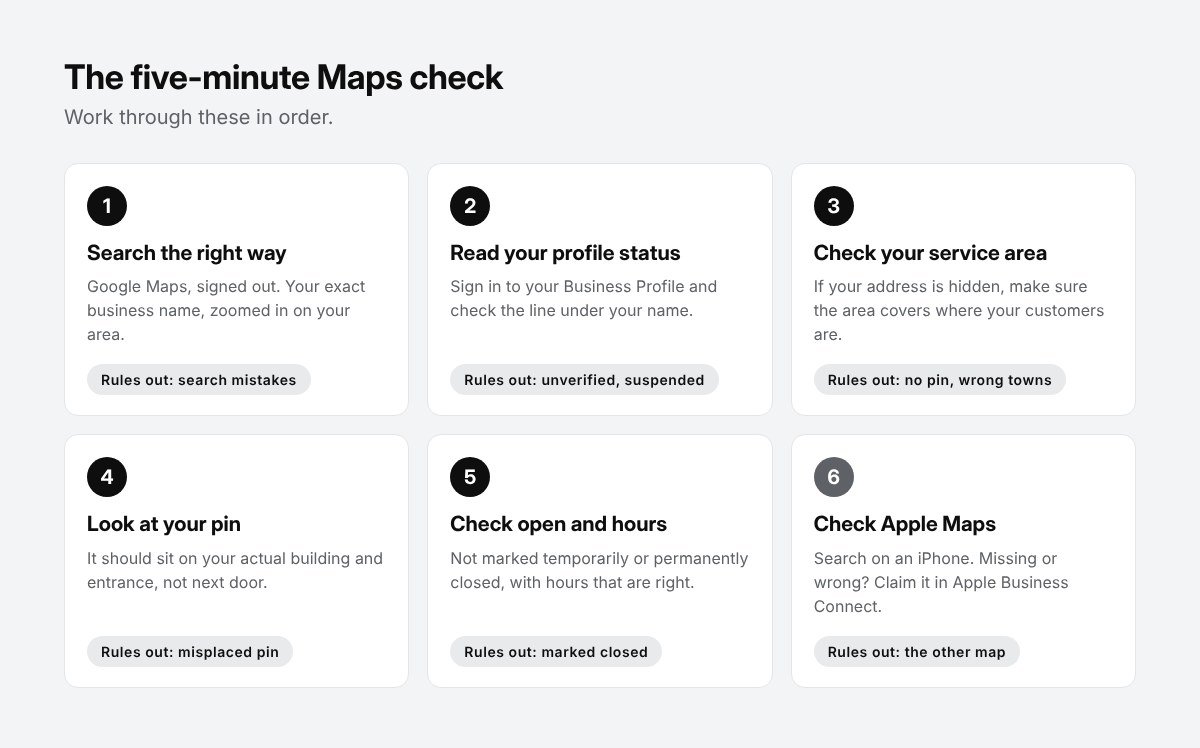
- Open Google Maps signed out, search your exact business name and zoom in on your area.
- Sign in to your Business Profile and read the status line under your name.
- If you hide your address, check that your service area covers where your customers are.
- Look at your pin. Is it on your actual building and entrance?
- Check that you’re not marked closed and your hours are right.
- Search for your business in Apple Maps on an iPhone. If it’s missing or wrong, claim it in Apple Business Connect.
FAQ
How long does it take for my business to show up on Google Maps? Google doesn’t promise a timeline. Most new profiles show up within a few days of verification, and edits like moving your pin can take a few days too. If it’s been a couple of weeks, check the status line in your profile.
Why has my business disappeared from Google Maps? The usual reasons are a suspension, being marked closed, or an edit you didn’t make. Anyone can suggest changes to your profile, and Google sometimes accepts them. Sign in and look for changes highlighted in your profile, and check your hours, address and category.
Why does my business show on Google Search but not on Google Maps? It’s the same listing, so it’s usually how Maps is displaying results. Zoom in, search your exact name, and check whether you’re a service-area business without a pin. If it still doesn’t appear, check your pin location and whether another business shares your address.
Do I need to be on Apple Maps too? If any of your customers use iPhones, yes. It’s free, and it’s the map a lot of them see first.
If you’ve been through all of this and still can’t find yourself, my SEO audit covers Maps, your Business Profile and your listings across the web. But try the five-minute check first.