Google Business Profile changes to check before the holidays
Over the last month, Google made it easier for customers to message a business from Google Maps, started testing an AI that answers those messages for you and began adding “Book online” buttons to some profiles on its own. Thanksgiving is November 26. If your profile is going to be busy over the holidays, now is the time to make sure what it says, and what it does when someone taps a button, is right. Here’s what changed and a checklist to work through before the rush.
What changed
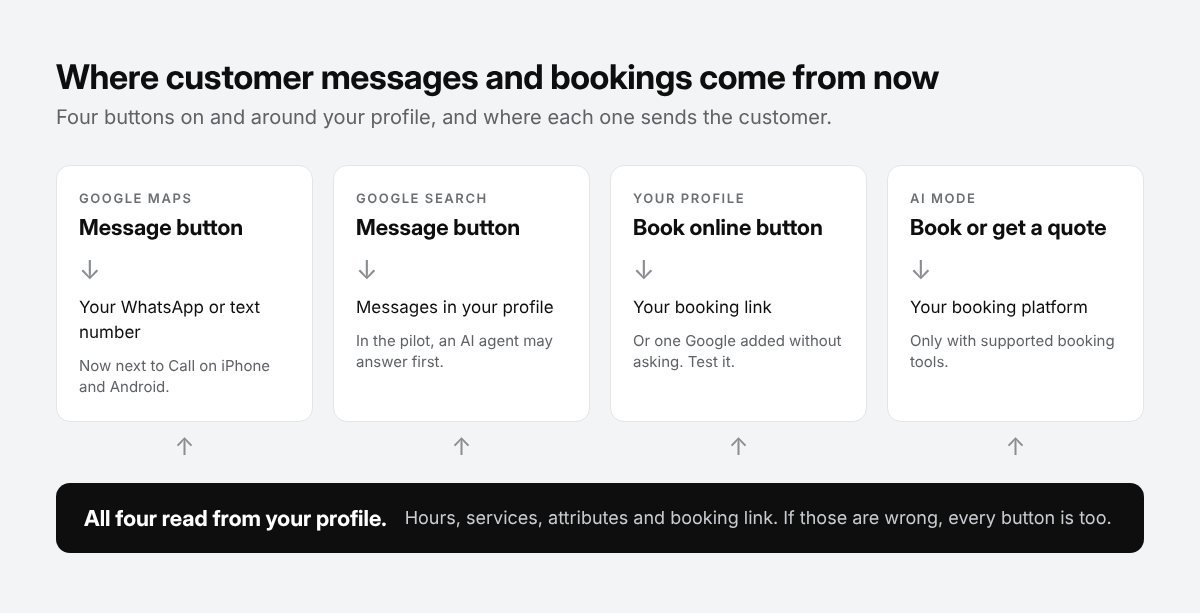
A Message button on Google Maps. On November 6, Google announced in its Small Business Bulletin that business messaging now works on Google Maps for iPhone and Android. The button now sits right next to Call, instead of being buried at the bottom of your profile. Messages can go to WhatsApp or regular text, depending on what you’ve linked.
An AI that answers messages for you. According to Search Engine Roundtable, which tracks these changes closely, Google is inviting more businesses into a pilot where an AI agent answers routine customer questions in your profile’s messages and hands off anything it can’t answer. You can take over a conversation at any time. The agent answers from what’s on your profile, so if your hours or services are wrong, its answers will be too. ChatGPT is building its own version of business listings too; I wrote up what happened when I tried claiming my business in ChatGPT.
Extra checks before messages turn on. Some businesses setting up messaging are being asked for their EIN and a privacy policy link, with a review that takes three to four working days (Search Engine Roundtable). If you want messaging live before Black Friday, start now.
“Book online” buttons you didn’t add. Since November 6, some owners are seeing a Book online button appear on their profile without setting one up (Search Engine Roundtable). Google hasn’t confirmed it, and some of these links have returned errors. Booking from Google is also spreading to AI Mode, which I covered in my post on AI Mode booking.
A new home for your profile. Google is beta testing Google Business Home, a Gemini-powered dashboard that puts your Business Profile, Merchant Center, YouTube and Ads in one place (Google). For now it’s limited to select business categories in the US and UK.
Offers can show up on your profile, including ones you didn’t post. Google published a help page on managing offers (Google). Offers can come from your own posts or from linked social media profiles, and the page explains how to remove offers a third party added without your permission.
Review appeals are slow again. Google says review appeals are taking longer than usual because of high volume and won’t give a timeframe (Google). Filing the same appeal twice won’t speed it up.
Still in testing. Google is also trying out new performance reports with sections for engagement, reviews, audience and search trends, moving Posts higher on the profile and verifying businesses with a photo of a government ID (Search Engine Roundtable). None of these are available to everyone yet.
Your holiday checklist
Most of this takes a few minutes each. Work through it in order, since the first items matter most. If your profile isn’t showing up in search at all, fix that first. I walk through the usual causes in why your business might not be showing up on Google.
1. Set special hours for every holiday. In your profile, go to Edit profile, then Hours, then Special hours, and add each date (Google). Set them even for days you’re open as usual, because confirmed hours tell customers your listing is current. The 2026 dates most businesses need:
| Holiday | Date |
|---|---|
| Thanksgiving | Thursday, November 26 |
| Black Friday | Friday, November 27 |
| Small Business Saturday | Saturday, November 28 |
| Christmas Eve | Thursday, December 24 |
| Christmas Day | Friday, December 25 |
| New Year’s Eve | Thursday, December 31 |
| New Year’s Day | Friday, January 1, 2027 |
Special hours cover closures of up to 6 days in a row. If you’re closing for 7 days or more, mark the business as temporarily closed instead (Google).
2. Decide who answers messages. With the Message button now next to Call on Maps, expect more texts. If you turn messaging on, make sure the WhatsApp or text number it uses goes to someone who checks it daily. Slow replies are worse than no button at all. If nobody can cover it over the holidays, leave it off for now.
3. Check your booking link. Search for your business, look for a Book online button and tap it. If it goes somewhere wrong, errors out or wasn’t set up by you, change or remove it in the Booking section of your profile.
4. Read your profile like a stranger would. If you join the AI messaging pilot, the agent answers customers from your profile. Check that your services, service areas, description and attributes (like “online appointments” or “onsite services”) are accurate and complete.
5. Check what Google collected about you. Google sometimes calls businesses with an automated assistant to confirm details like parking or hours, and shows what it learned in a Collected info tab (Whitespark). Delete anything that’s wrong.
6. Post a holiday update. Add a post with your holiday hours, a seasonal offer or your last day to book before the new year. Google is testing a spot for Posts higher on the profile, so they may get seen more than they used to.
7. Look for offers you didn’t post. Scroll your profile in Search. If you see a discount or badge you didn’t create, use the removal steps in Google’s offers help page.
8. Reply to recent reviews. Holiday customers read reviews before they call. Reply to new ones, especially negative ones. If you’ve appealed a review, don’t appeal it again; Google says duplicates don’t help.
FAQ
Do I have to turn on messaging?
No. It’s optional, and a Message button nobody answers can cost you more than it earns. Turn it on when someone can reply the same day.
Will setting holiday hours hurt my rankings?
There’s no sign that it does. Google asks businesses to confirm holiday hours, even when they’re unchanged, so customers can trust what they see.
Google added a Book online button I didn’t set up. Should I remove it?
Tap it first. If it goes to a page where customers can actually book or contact you, it may be worth keeping. If it errors out or goes somewhere you don’t control, change it to your own booking or contact page, or remove it.
I can’t find the new Message button or Business Home on my profile. Why?
Both are rolling out in stages, and Business Home is limited to some business categories in the US and UK. If you don’t see them yet, there’s nothing to fix.
What I don’t know yet
- Whether Google is adding Book online buttons on purpose, and which businesses get them.
- Which businesses qualify for the AI messaging pilot, and whether it will stay free.
- When the new performance reports and Business Home will reach everyone.
I’ll update this post as Google confirms more.
A Google Business Profile cleanup covers your hours, categories, services, attributes and booking links, starting at $299.